Trending

EA and DICE have managed to hit the mark with their new Battlefield 6. The worldwide launch of the newest entrant to the Battlefield series has amassed a record number of players across all platforms.
With new maps and visual upgrades, combined with their classic Battlefield formula, players can't get enough of the game. With the official worldwide launch of the game, players can officially get a look at their career stats. Here's a guide on how you can check your Battlefield 6 career stats.

How to Check Your Battlefield 6 Stats
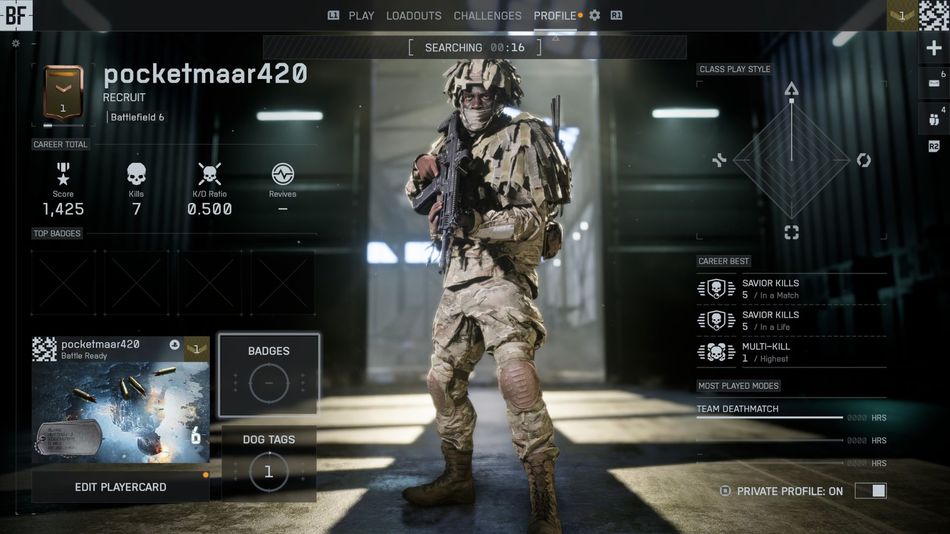
EA has added the new feature of checking your career stats in the Battlefield 6 game. Here's a step-by-step guide on how to check your complete career stats:
- Launch Battlefield 6
- Enter the main menu
- Scroll to the Profile tab at the top right of your screen
- You will be able to see all of your career stats in one place
Here's everything included in the career stats page:
- Your Level
- Kill/Death Ratio
- Career Total Score
- Total Kills
- Total Revives
- Top Badges
- Class Play Style
- Career Best
- Most Played Modes
Your career total will not be reset with each season; rather, it will carry over for the entirety of the game's lifecycle. Previously, the open beta stats were available through EA's website; however, with the full release of the game, they have been transferred to the game's profile page.
Your career stats profile is initially visible to everyone you know, specifically your friends. However, you can easily make it private by clicking the prompt on the bottom right of your screen.
So, go ahead and check your career stats to see where you stand against your friends and other players. With future updates EA might add new stats and information to the Profile tab to make it more detailed for players.

DON'T MISS: