Trending

Similar to every RPG title, Avatar: Frontiers of Pandora, Ubisoft's latest RPG action-adventure, features a primary character that players can create at the game's outset. During this phase, players can choose specific cosmetic characteristics for their character.
Nevertheless, these characteristics are not set in stone. If, at any point during the game, you wish to alter the appearance, gender, or voice of your character, you will have the flexibility to do so.
If you're unsure about how and where to make these changes, this guide provides the solution to that question.

How to change appearance in Avatar: Frontiers of Pandora
This feature will be accessible in nearly every significant settlement and is referred to as the "Changing Place." However, locating it can be a bit perplexing since such areas are not marked on the map in Avatar: Frontiers of Pandora, nor will their name appear when you approach. Therefore, you must rely on recognising them based on their visual appearance.
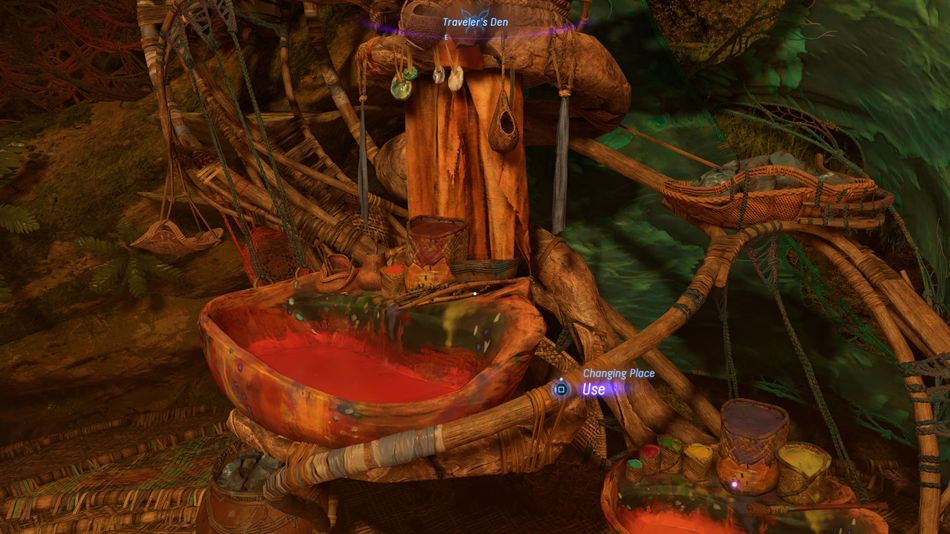
Identify Changing Place by the prominent bowl filled with a red colour. Once located, remember its position so that, if desired, you'll know where to return and alter your character's appearance. The first two you can find inside Hometree and Resistance Headquarters.
The choices for altering the character remain consistent with those available at the beginning of the game. You can modify the face, hair, skin appearance, bodypaints, voices, and body types. It's important to note that these adjustments are purely cosmetic and do not impact the character's attributes or strength in any way.
DON'T MISS!
- Avatar: Frontiers of Pandora - Sarentu Totems puzzle solution
- Avatar: Frontiers of Pandora - How to permanently increase health
- Avatar: Frontiers of Pandora - How to upgrade gear
- Avatar: Frontiers of Pandora: How to reach the top of the cliff in "Song of the Ancestor" quest
- Avatar: Frontiers of Pandora - How to follow objectives