Trending

Ubisoft's newest RPG action adventure, Avatar: Frontiers of Pandora, adheres to the well-established Ubisoft game formula that players have experienced over the past decade.
Navigating the expansive world of Pandora in search of objectives can prove challenging, attributed mainly to the vast scale of the environment and the intricacies of its design. Consequently, when tasked with a mission objective, you may find yourself disoriented, unsure of the next steps or the appropriate direction to proceed.
If locating objectives poses a challenge and you frequently find yourself disoriented in the expansive world of Pandora, rest assured, you're not alone. This guide aims to assist you in overcoming this issue.

How to locate objectives in Avatar: Frontiers of Pandora
Without delay, the procedure is straightforward: press and hold the Na'vi senses button to scan the surroundings. The destination you seek will consistently illuminate in white, resembling a raindrop shape, indicating the direction you should proceed.
When navigating within a structure and facing obstacles that prevent a direct path, try to identify alternate routes, ensuring that you are moving in the designated direction.
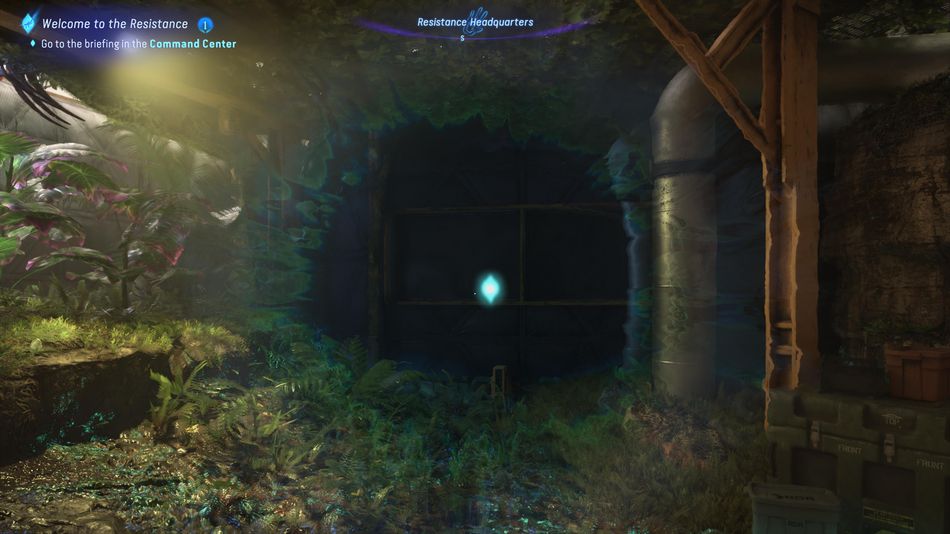
Another valuable tip is that upon pressing the Na'vi senses button, guidance on your destination will be displayed in the top left corner. Follow the explanations and hints provided, such as locating the destination under a large tree or above a waterfall. In contrast to previous Ubisoft games, where the objective tracking system was straightforward with markers on the compass or minimap, this mode encourages a more comprehensive approach, prompting additional exploration.

DON'T MISS!