Trending
Starfield, Bethesda's latest massive RPG, boasts an array of intricate mechanics that can't be easily recalled all at once; grasping them fully may require some additional time and effort.
In Starfield, which is primarily a shooter game, you'll find a diverse selection of weapons available for your use. Nevertheless, the game doesn't initially provide guidance on how to switch between weapons during combat or add them to your weapon wheel.
If you're keen on learning how to switch weapons in the midst of combat and how to include them on your weapon wheel for swift access, we've got a guide tailored just for you.

How to add weapons to the wheel in Starfield
Right at the outset of the game, your initial weapon will be a mining laser, used for extracting various ores. Following your initial encounter with pirates, you'll acquire a handgun, prompting the immediate question: how do you switch between these weapons?
The solution involves pressing the three-line button on your controller, followed by accessing the inventory menu. Then, proceed to navigate to the initial weapons tab and open it.
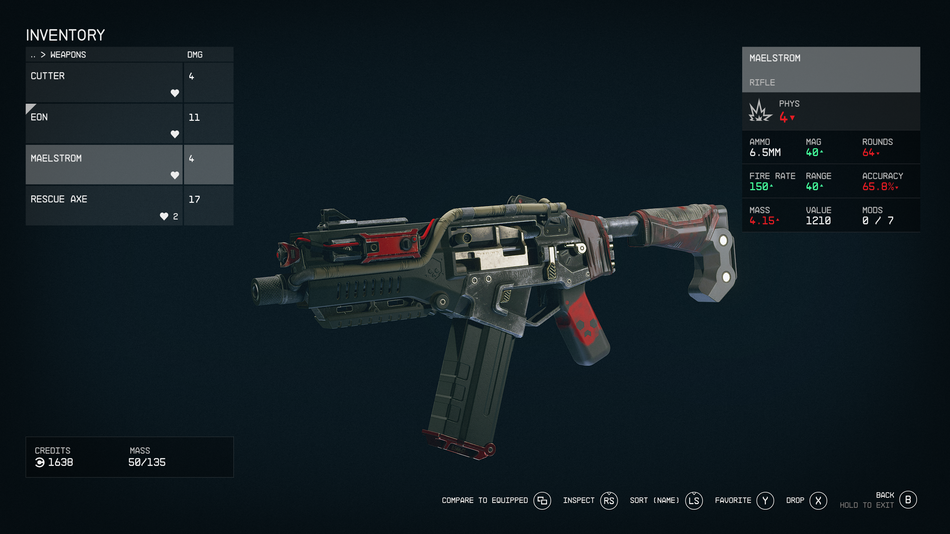
Upon entering this menu, choose the desired weapon and press the Y button labelled "favourites." This action will generate an unassigned D-PAD section where you can assign your preferred weapons and healing items.
When you add weapons to your weapon wheel, you can readily access them in the midst of combat by simply pressing the corresponding D-PAD button. Each D-PAD button can accommodate up to three weapons, allowing you the flexibility to organise them as per your preference.

DON'T MISS!