Trending
We've just booted up Battlefield 2042 hoping to spend some quality Friday night time with EA and DICE's latest shooter but sadly, the match won't start no matter how many times we hit that "Retry" button.
The most common error that we got as we desperately tried to get into a match and get those kills, is "Unable to Load Persistence Data", which basically means the game can't connect to online services so you can't even get into the main menu.
At the moment, it does not seem that there's a solid fix for the error which is most probably some mess up on the server-side, as EA already confirmed via Twitter. However, there are some steps that you can try to solve this issue but don't get your hopes up. These fixes do not seem to work for everyone.
How to Fix Battlefield 2042 "Unable to Load Persistence Data" error
- First up, repair your game in Origin. My Game Library, right-click on Battlefield 2042 and hit Repair.
- Make sure your Firewall is not blocking Battlefield 2042 app or Origin.
- Type "Firewall" in Windows Search, click on "Firewall and Network Protection" then "Allow an app through Firewall".
- Turn off your antivirus program of you have one
- Restart your router
- Restart Battlefield
- Start Apex Legends if you have it installed, quit, then start Battlefield 2042 (yeah, this actually works for some people)
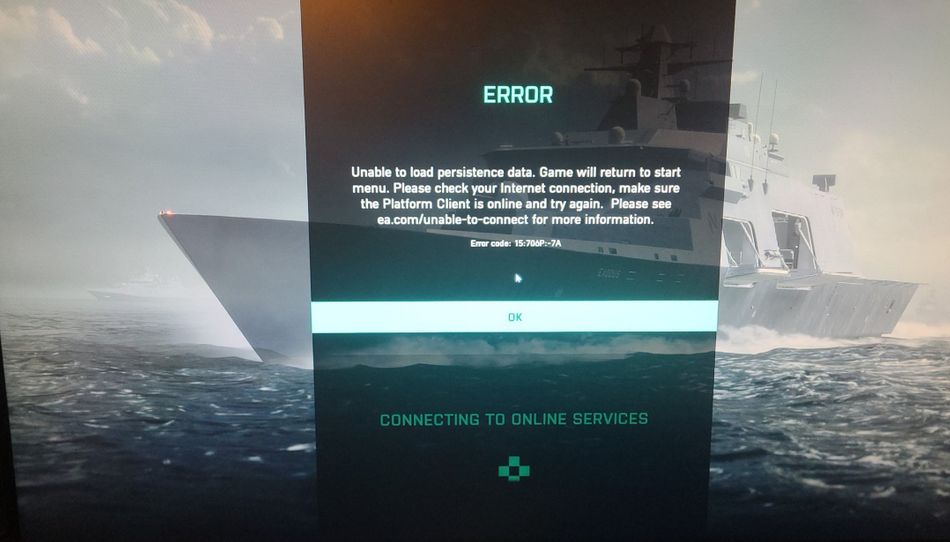
If none of these fixes work, we're sorry, but until EA developers release an update, we and you, who have this issue, will simply have to wait, which is pretty frustrating.
Be better, EA, for the sake of your game.
Battlefield 2042