Trending
ARC Raiders has a diverse pool of maps to drop in every round. Each map boasts its own unique visual identity. To add a new layer of visual and technical challenge, Embark puts in different map conditions every hour.
Usually when players drop into a round, the maps remain in the normal state for the normal playlist; however, to spice things up, Embark adds different map conditions to all maps every few hours in-game.
If you're waiting to jump into a specific map condition to complete your trials or look for specific blueprints, then here's the easiest way to check the map condition schedule in ARC Raiders.
How to Check Map Condition Schedule in ARC Raiders
Following the launch of ARC Raiders, there was no official method of checking the map condition schedule. However, after the Flashpoint update, Embark has added an official page for the map condition schedule. Here's how you can check the map condition schedule in ARC Raiders:
- Head to the official ARC Raiders website
- Hover to the top left of the screen and click on the "About" tab
- Select the Map Condition option from the drop-down menu
- You will now see the map condition schedule for the next 12 hours
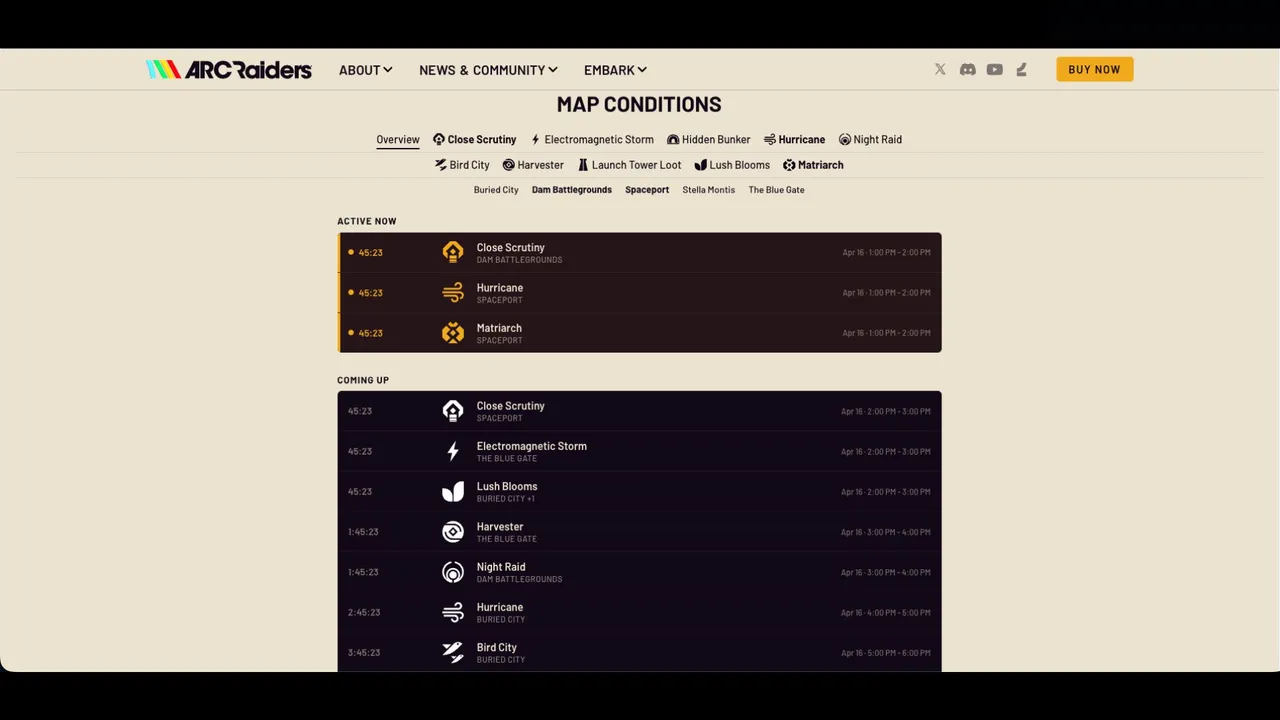
In the map condition schedule page, you can filter out your favourite map condition and maps. This can help you plan out your play sessions accordingly. Following the Flashpoint update, Close Scrutiny and Hurricane map conditions are more frequent in the rotation.
However, other map conditions like Hidden Bunker, Locked Gate, and Lush Blooms are also on schedule every now and then. As these map conditions are important for trials and farming fruits for feeding Scrappy, you can expect them to be in rotation almost every day.

DON'T MISS: