Trending
Valorant patch 7.07 has just hit the servers, and one change that seemed relatively minor has flown under the radar, but many players were quick to report "bugs" related to the audio in the game.
Now the bugs in question are actually the sound changes that Riot made with the latest patch. This is a more detailed explanation of the changes that Riot released along with patch 7.07:

"In Patch 7.06, we fixed a bug that allowed the game to output surround sound when certain conditions were met, but the surround mix was untested and unsupported. Valorant currently only supports stereo and mono sound output.
To simulate surround sound on headphones, we offer an HRTF setting. We do not recommend combining the HRTF setting in the game with other surround sound virtualization software at the same time since this will result in double processing. Note that other surround sound virtualization software cannot derive surround sound information from the stereo mix."
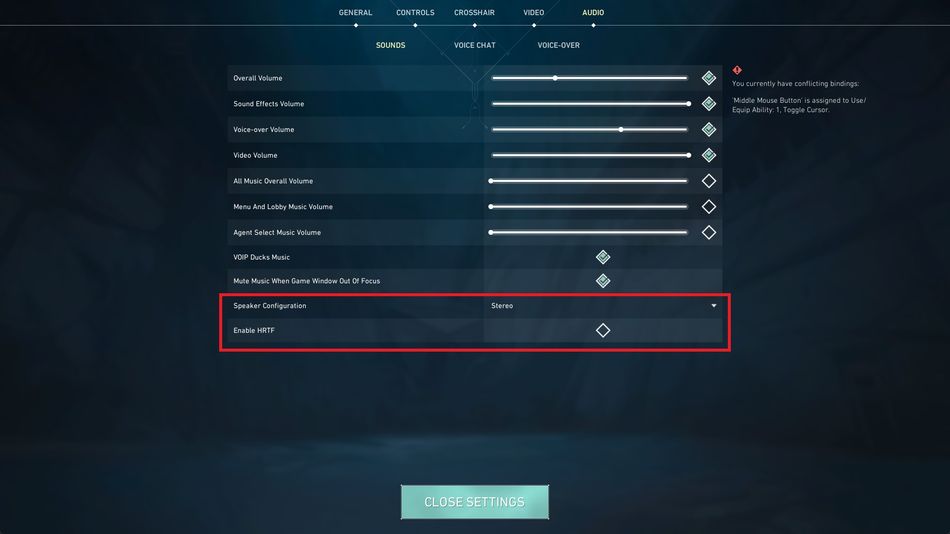
The setting is by default turned off but could have turned itself on for some players. If your audio sounds or "feels" different, make sure to check if the HRTF setting has been turned on, and also make sure that your sound output device has been correctly selected.
If you use Nvidia Broadcast, having it turned on while the setting is turned off will result in audio glitches where all sounds (gunshots, spike plants, explosions, etc.) that are coming from behind the player will not be played correctly and can sometimes even be completely silenced.

- Rainbow Six Siege - How to fix mouse stuck on screen
- Is there aim assist in the console version of Rainbow Six Siege?
- Riot addresses the ranked boosting issue with Valorant Patch 7.05
- Valorant pro player DaveeyS from KRÜ Esports passes away at 23
- Sledge becomes Master Chief in a Rainbow Six and Halo crossover
- Valorant gets a new Premiere trailer called Bring It