Trending
If you're experiencing the issue of your mouse being stuck on the screen while playing Rainbow Six Siege, there are a few steps you can take to try and resolve the problem before reinstalling Ubisoft's most famous tactical shooter. After the usual "turn it off and back on again", you can try the following steps.
Get into a game (any mode) and wait for roughly the end of the round and then start spamming the escape button and clicking the mouse in the area where the options button would be. Once in the menu, wait for the round to end and close the menu once on operator select.
If this does not help, you can try the following:
1. Alt+Tab and Alt+Tab Back
Sometimes, the issue might be caused by the game not properly recognizing your mouse. Pressing Alt+Tab to switch out of the game and then Alt+Tabbing back might help refresh the mouse input.
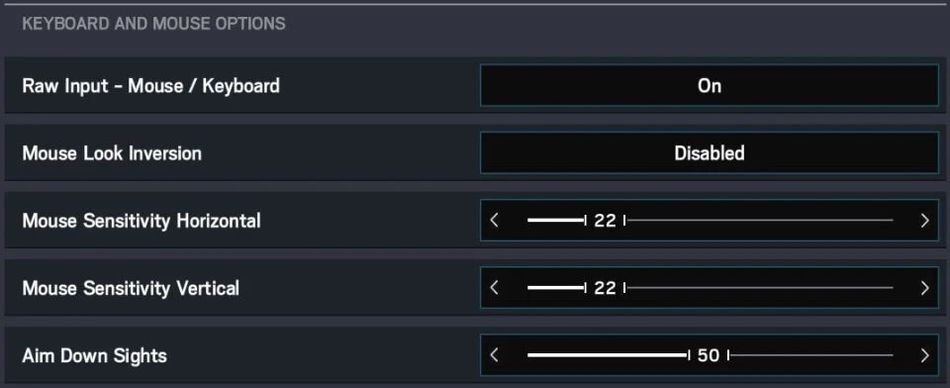
2. Check Mouse and Raw Input Settings
Ensure that your mouse settings within Windows are properly configured. Adjust the pointer speed and other settings to see if it helps. Additionally, in the settings, try toggling the "Raw Input" option. This can help bypass any potential issues with mouse acceleration.
3. Update Graphics Drivers
Outdated or incompatible graphics drivers can sometimes cause input issues. Make sure your graphics drivers are up to date. Visit the website of your graphics card manufacturer (NVIDIA, AMD, Intel) to download the latest drivers.
4. Disable Overlay Programs
Overlay programs like Discord, GeForce Experience, and others can sometimes interfere with games. Try disabling these programs while playing Rainbow Six Siege.
5. Fullscreen/Windowed Mode
Try switching between fullscreen and windowed mode to see if that resolves the issue. You can do this in the game's settings.
Borderless Windowed Mode: If the issue persists in fullscreen mode, try playing the game in borderless windowed mode. This can often provide a smoother transition between the game and other applications.
6. Verify Game Files: If none of the above steps work, there might be a corrupted game file causing the issue. Use the game's launcher to verify and repair game files.
- Rainbow Six Siege: What is XIM and does Mouse Trap detect it?
- League of Legends 13.15 Patch Notes: Prestige Soul Fighter Shaco, Kai'sa nerf and more
- Valorant's Champions 2023 Anthem is called Ticking Away
- Valorant 7.02 patch notes: Esports Hub, bug fixes and more
- Valorant: List of all chat commands and shortcuts you can use