Trending
League of Legends is an Esports game that is well-optimized to run on various hardware, ranging from high-end gaming machines to low-end PCs. It can run smoothly on almost any computer at a stable 60 FPS.
However, some users have experienced FPS issues, such as random drops below 60 FPS or inadequate frame rates. Despite attempting solutions like disabling Vsync, using Borderless Fullscreen, or reducing graphics settings, the problem persists.
This article offers a solution for users experiencing FPS issues in League of Legends. Although the game is generally well-optimized for various hardware, some users have reported random drops in FPS.

Disabling Full-Screen Optimization
This feature can cause FPS issues in League of Legends. The article provides steps to disable Full-Screen Optimization to improve FPS performance in the game:
- Click the Start button
- Open up settings by clicking the Setting icon
- Click the “Gaming” option to open a window called the ” Game Bar"
- Uncheck the “Show game bar when I play full screen games Microsoft has verified.” option
- Close the window
It's important to note that disabling Full-Screen Optimization will affect all applications, not just League of Legends. Other applications may also experience changes in performance.
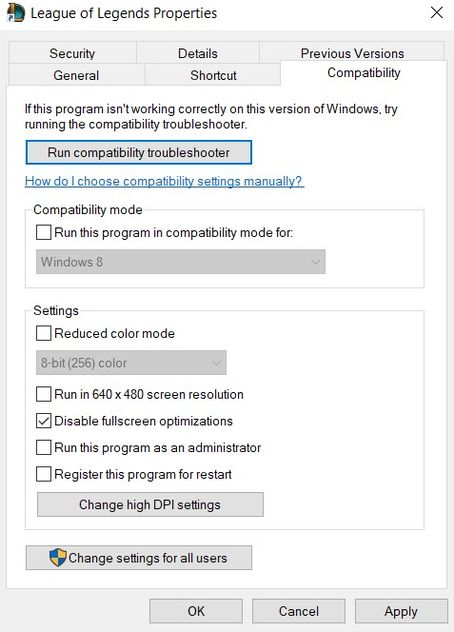
However, if you want to keep Full-Screen Optimization for other applications and only disable it for League of Legends, there is a way to do so:
- Right-click on the League of Legends icon and click on Properties
- Click on the Compatibility tab.Check “Disable Full Screen Optimizations”Click OK and close the window
- Go to where your League folder is located; it’s typically C:\Riot Games\League of Legends\Game
- Right-click League of Legends.exe and click on Properties
- Click on the Compatibility tab
- Check “Disable Full Screen Optimizations” and press OK
DON'T MISS:
- League of Legends: Aram turrets receive major overhaul in patch 13.5
- League of Legends - Azir mini-rework: Abilities, Release date and more
- League of Legends: Game mode 2v2v2v2 - Everything you need to know
- League of Legends 2023: Clash schedule is officially out
- League of Legends: ARAM Clash is returning in 2023