Trending

Valorant, a highly popular FPS hero shooter from Riot Games, debuted in 2020 and has swiftly evolved into a prominent esports title, hosting various events and competitions. Inspired by elements from both Counter-Strike and Overwatch, Valorant is a tactical 5-on-5 shooter where teams engage in round-based plant-and-defuse scenarios.
As with any competitive game, running into errors is something you don't want, especially during a game. So today we are going to address one of the most common errors Valorant players face, the VAN 185 Error, and offer solutions for it.
What is the VAN 185 Error?
The VAN 185 error has cropped up as a fresh headache for several Valorant players in 2024. One user on Reddit mentioned encountering this issue while attempting to resolve the VAN 1067 error.
Some players have found themselves facing a VAN error after updating their Nvidia driver to version 555.85. It seems that the VAN 1067 error, linked to game crashes stemming from specific cache issues in TPM and VGC, might be related to VAN 185.
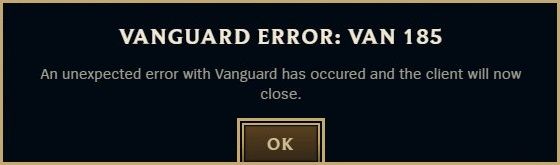
As of now, the support Valorant websites haven't addressed VAN 185, indicating it's a new hiccup in the game without a clear cause or fix.
How to fix the VAN 185 Error?
To fix the VAN 185 error in VALORANT, the simplest approach is to restart the client. Here's a step-by-step guide:
- Refresh your system to ensure everything is running smoothly.
- Navigate to the bottom right of your screen and right-click on the Riot Client icon.
- Select "Exit" from the menu.
- Press the Windows key on your keyboard or click on the Windows logo in the bottom left corner of your screen.
- In the search bar, type "Riot Client" and hit Enter.
- Launch the Riot Client.
If the error persists even after restarting the client, players can try uninstalling Riot Vanguard and Valorant. After uninstalling, they should reinstall the latest versions of both software on their system.
DON'T MISS: