Trending

Call of Duty's yearly release is almost here, with Treyarch gearing up for the release of Call of Duty: Black Ops 6. Call of Duty: Black Ops 6 or previously known as Call of Duty: Black Ops Gulf War, is set to be a direct sequel of 2020's Call of Duty: Black Ops Cold War.
Every year Activision allows players to preload their favourite Call of Duty titles a few days before the release date, so they can end up getting into the game without any interruptions. The tradition of preload continues with Call of Duty: Black Ops 6 and here's how you can preload the game on PC, PlayStation and Xbox to jump into action on day one.
How to preload on Call of Duty: Black Ops 6 on PC, PlayStation and Xbox
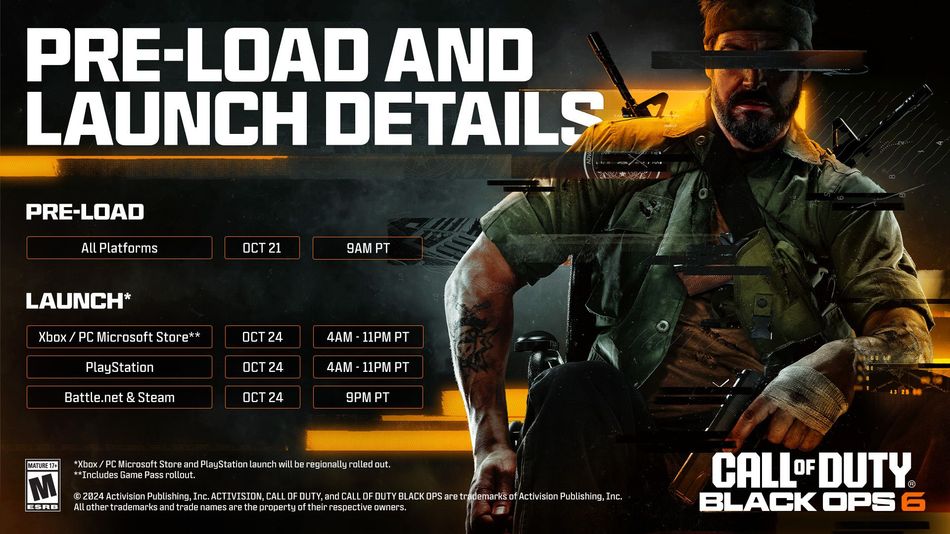
The preload for Call of Duty: Black Ops 6 on all platforms begins on October 21 at 9 AM PT. After preloading the game, players have to wait until the game's official release time to play it. Here are the release date and time of Call of Duty: Black Ops 6 on all platforms:
- PC (Battle.net & Steam): October 24 at 9 PM PT
- Xbox and Microsoft Store: October 24 at 4 AM – 11 PM PT
- PlayStation 4 and 5: October 24 at 4 AM – 11 PM PT
How to preload the game on Steam:
- Click on Call of Duty HQ app in your library.
- Click on the Settings icon.
- Select Properties
- Now navigate to the DLC tab
- Select all DLCs with the name of Call of Duty: Black Ops 6
- Start the update
How to preload the game on Battle.net:
- Select Call of Duty
- Click on the Settings icon
- Now select the Modify Install option
- Select Call of Duty: Black Ops 6
- Click on Install
- Start the update
How to preload on PlayStation:
- Hover over the Call of Duty app on your PlayStation's home screen.
- Click on the options button
- Navigate to "Manage Game Content"
- Now select all Call of Duty: Black Ops 6 files
- Click on Install
How to preload on Xbox:
- Hover over the Call of Duty app on your Xbox's home screen.
- Click on the Start button
- Navigate to "Manage Game and Add-Ons"
- Now select all Call of Duty: Black Ops 6 files
- Click on Install
To preload Call of Duty: Black Ops 6 on all platforms, players must first install the Call of Duty HQ app from their respective shopfront. Without the Call of Duty HQ app, Call of Duty: Black Ops 6 will remain inaccessible.

DON'T MISS:
- Call of Duty Black Ops 6 won't require NASA PC to run at highest settings according to official specs
- Call of Duty: Black Ops 6 - New Global Weapon Builds Explained
- Call of Duty: Warzone 2 and Modern Warfare 3 - How to unlock the new JAK Volstorm conversion kit
- Call of Duty: Black Ops 6 - All Maps available at launch