Trending
If you're jumping into Elden Ring again this weekend to check out the brand new expansion Shadow of the Erdtree, which is awesome by the way, chances are that you'll also look forward to seeing a couple of new features that From Software introduced with the latest patch.
These features are added to help players easily identify new items in their inventory so we have a brand new tab for new items as well as markers that appear beside new items.
However, for some reason, From Software decided against making these the default option so you'll have to activate them by yourself. Here's how to do that.

Elden Ring Recent Items tab and Mark New Items activation
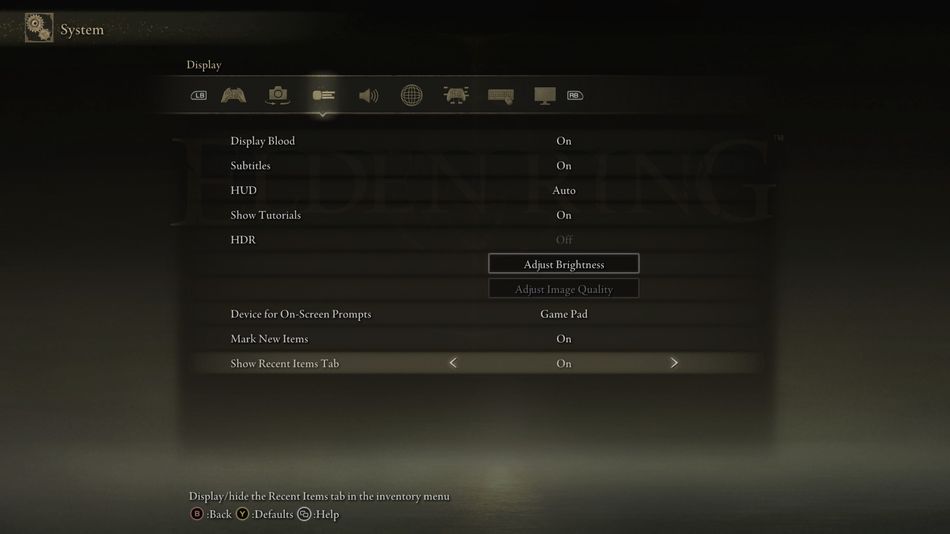
Basically, to get both of these helpful new features, you have to enable them in the game's settings.
- Go to Settings.
- Under the Display tab, look for the Mark New Items and Show Recent Items tab.
- Set both to ON.
Now, new items in your inventory will go to the Show Recent Items tab and you'll also see a yellow exclamation point marking the new items.
Elden Ring: Shadow of the Erdtree expansion is available now on PC, PlayStation 5 and Xbox Series X|S.
DON'T MISS: