Trending
Call of Duty: Modern Warfare 2 has been a great success for both Infinity Ward and Activision. Call of Duty: Warzone 2.0 is the new and improved battle royale experience that borrows its core aspects from its predecessor. For a shooter game like this, having the best aim settings is essential.
Horizontal stick sensitivity, vertical stick sensitivity, deadzone, and aim down sight (ADS) are the crucial sensitivity aspects. Horizontal stick sensitivity determines how fast your analog stick will respond to the left or right inputs in-game.
Vertical stick sensitivity determines how fast your analog stick will respond to the up or down inputs in-game. Deadzone determines how much an analog stick needs to move before registering the input. Lowering the deadzone will produce a fast and fluid experience while playing on a controller.
High sensitivity is the best for close-quarter fights. These are the best settings for high-sensitivity users:
- Horizontal Stick Sensitivity - 7-9+
- Vertical Stick Sensitivity - 7-9+
- Deadzone - 0.05
- ADS Sensitivity Multiplier - 1
- Aim Response Curve Type - Dynamic
- Aim Assist - Default
Low-sensitivity settings are usually used for snipers and strategic play styles. Here are the best low-sensitivity settings:
- Horizontal Stick Sensitivity - 5-6
- Vertical Stick Sensitivity - 5-6
- Deadzone - 0.05
- ADS Sensitivity Multiplier - 0.80
- Aim Response Curve Type - Dynamic
- Aim Assist - Default
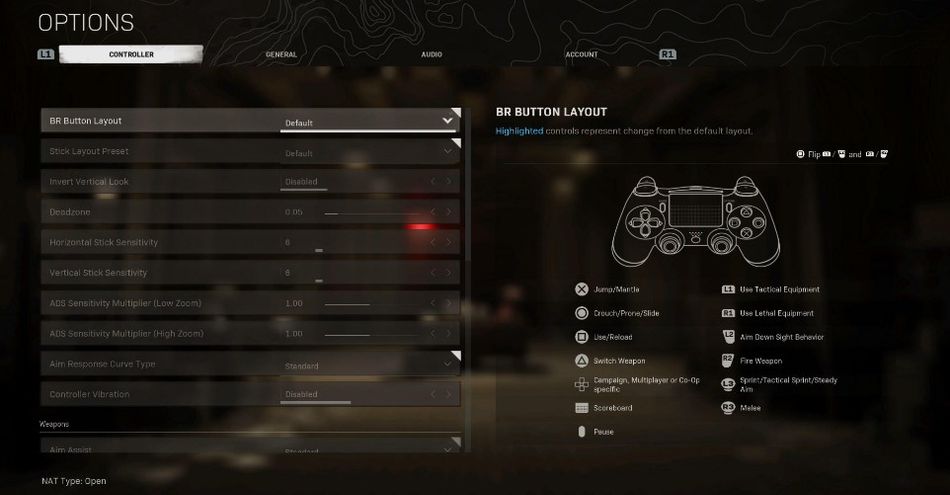
If these suggestions don't do the work for you, here is how you can change your controller sensitivity in-game:
- Go to the Options> Controller menu in the game. Everything related to sensitivity settings will display here
- Button layout and Stick Layout Preset are up to player preference and are generally set to “Default”
- It is recommended to disable controller vibration as it can be distracting in a gunfight
- As for Aim Assist types, we recommend default aim assist for most players

DON'T MISS: