Trending
Error code 8-0x00003700 seems to only target Rainbow Six Siege's console players, and many have reported having had this issue for an extended period of time before the issue got resolved (some did not manage to resolve it).
This specific error code is related to the server status of the game, and many have reported that it is usually something on the player's end rather than on the server's end. That being said, the status of the game should always be checked on Ubisoft's official support page. If you have done that, here are other ways to fix it.
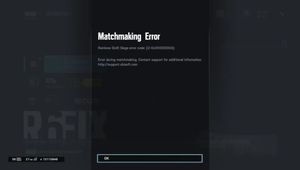
Ways to fix error code 8-0x00003700
Assuming that you have tried the standard steps where you restart your game and console and ensure your connection is stable, these are the next steps you can take before uninstalling and reinstalling the game or contacting Ubisoft support for additional help:
1. Make sure all of your Xbox Live and PSN subscriptions have been paid (This depends on which console you have). The consoles will shut off access to game servers if any subscription payments have not been fulfilled.
2. Restore all of your licenses
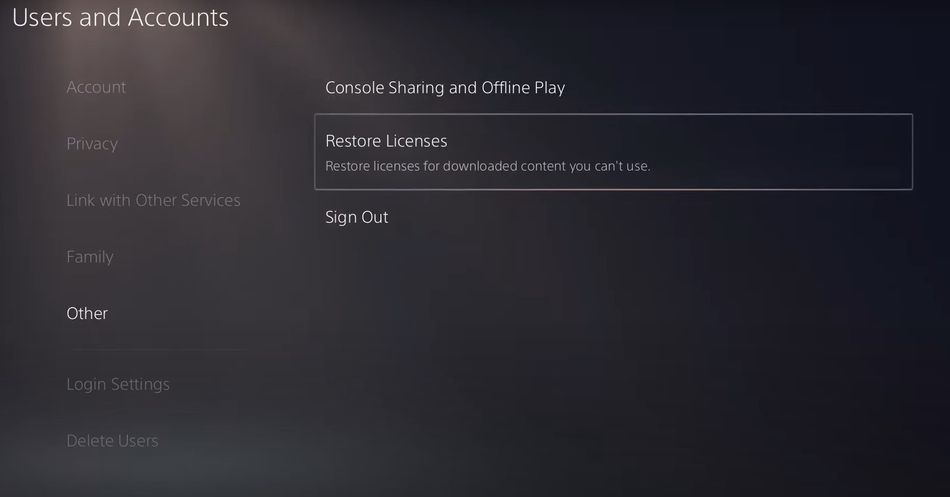
To do this:
- Open your console settings
- Go to Users and Accounts
- Click on "Others"
- Restore Licenses
- Select Restore
3. Once the game has launched, allow all cutscenes to play without skipping them
Ubisoft have not released an official guide on how to resolve this problem, but the steps above have proven to help many players who have been experiencing this issue.
- Rainbow Six Siege - How to fix mouse stuck on screen
- Is there aim assist in the console version of Rainbow Six Siege?
- Rainbow Six Siege - How to fix error code 8-0x00003700
- Valorant patch 7.04 - Jett, Astra, Breach and Skye get massive nerfs
- Cyberpunk 2077: Phantom Liberty is not a PC melter but it will increase system requirements
- Cyberpunk 2077 elaborates on vehicle combat feature