Trending
Gotham Knights is an open-world RPG that you can either solo-play or play with one other hero. Warner Bros. has made sure to make it the most dynamic and interactive Gotham City yet for you and your friends to explore.
How exactly are players supposed to enter a multiplayer session or host a multiplayer session? The steps to doing so are relatively easy and you've probably done them just by playing the game.

- Progress through main mission 1.2. The mission is called Langstrom Drive
- Go back to the Belfry tower once the mission is completed
- Head to the computer and read the newspaper right from it
- After the cutscene, complete the Co-Op tutorial and you are set
Main mission 1.2 is the second mission you'll do in the main story or the first main mission after the prologue.
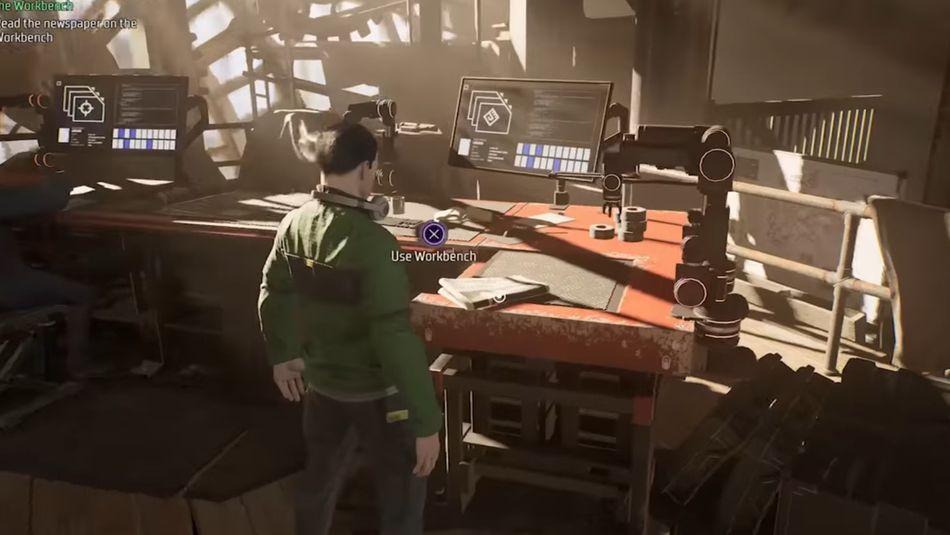
Once the cutscene of the interaction with Alfred finishes, you may change the privacy of your lobbies with the instructions given by the tutorial. Your games can be joined by whoever wishes to join, your friends or the friends of your friends.
It is important to mention that if you or your friend are at different levels, the game will scale the guest's level to the host's level. This similar feature was used in Elden Ring multiplayer to avoid one player "carrying" the other through the missions.
If a player completes a mission in a friend's lobby, they do not have to replay the mission in their own world. Aside from that even if you join the lobby of a lower-level friend, your XP progression stays the same.

DON'T MISS:
- How to fix Fallout 3 freezing and crashing after Patch 1.7.0.4
- Rainbow Six Siege: How to fix "Content unavailable" Alpha Pack error
- Valorant: How to find the perfect sensitivity
- Scorn: Were our standards too high for the freshly released horror?
- Rainbow Six Siege back to basics: How to play Support on attack