Trending

Counter Strike 2 is a strategic shooter from Valve. The sequel to Counter Strike: Global Offensive, the game has been widely successful worldwide since its launch last year.
All Counter Strike titles feature their own distinctive console commands players can use to change different in-game properties. If you're unfamiliar with how these commands work in Counter Strike, here's a list of all the basic console commands and what they do in-game.

All Basic Console Commands in Counter Strike 2
To use console commands in Counter Strike 2, you must first enable the console. If you're new to Counter Strike 2, or a returning player, here's how you turn on the console in Counter Strike 2:
- Head to the in-game settings.
- Click on the "Game" tab.
- Now set the "Enable Developer Console (~)" option to "Yes."
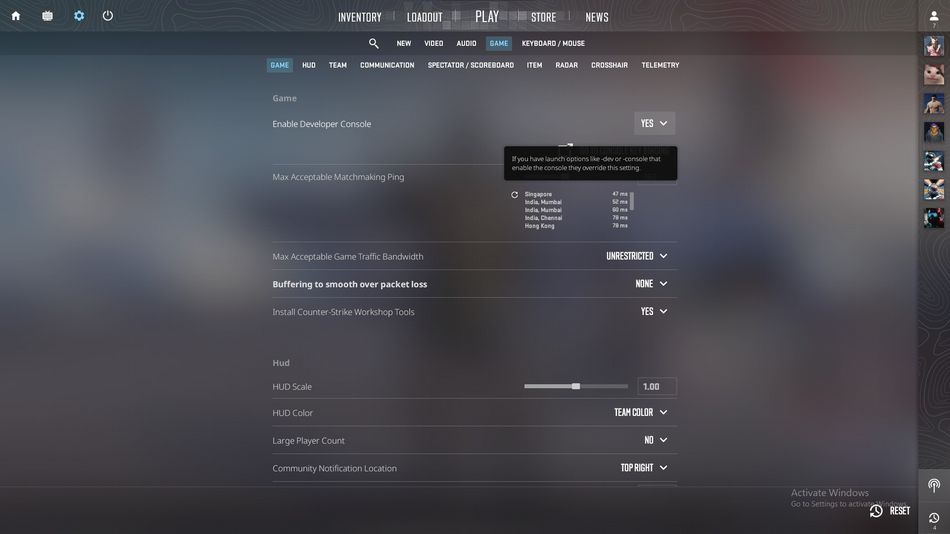
After restarting the game, you will be able to access the console by pressing the "~" button, which is just below the Esc and besides the "1" button on a keyboard.
Being one of the most sophisticated strategic shooters of all time, Counter Strike features thousands of console commands that can modify different in-game settings without messing with the in-game settings menu.
However, we have narrowed the list down to the basic console commands you should consider using to make your experience better in Counter Strike 2.
- cq_netgraph 1: Displays all necessary in-game latency information.
- cl_showfps 1: Shows the dynamic FPS count during gameplay.
- fps_max 0: Set a maximum limit for FPS.
- quit: Quit to desktop.
- disconnect: Leave the current server/mode.
- bind [action] [key]: Assign different actions to keys.
- volume: Adjust the game's master volume.
- voice_modenable: Toggles voice chat on or off.
- voice_scale 0.5: Teammate voice volume control (0–1 scale).
- r_drawtracers_firstperson 0: Disables weapon tracers.
Utilising console commands in Counter Strike 2 can save you a lot of hassle if you need to adjust a certain thing in-game. Moreover, these console commands will also help you adjust HUD settings during a match without heading into the settings.

DON'T MISS: