Trending

Since Palworld, the latest survival from Pocket Pair, is still in the beta phase, some problems with the game are more than evident, and while some problems developers try to address, some of them you can fix yourself. That's exactly the case with the Pals glitching red issue.
This issue occurs mostly when you are under attack and deliberately or accidentally leave the game. Once you get back to the game, you will notice that your Pals are struggling with their tasks, walking really slowly with the red circles blinking around their icons on heads-up display.
If you are curious how to fix this issue and make your Pals as productive as they should be, we've prepared a guide that will help you fix this problem once and for all.

How to fix Pals the glitching red issue
The resolution to this issue is quite straightforward once you comprehend why the problem arises. When your base is under attack, Pals enter defence mode, and the game maintains this status. If you exit the game during this phase and return later, their status remains unchanged. As there are no immediate enemies nearby, the Pals begin to experience glitches.
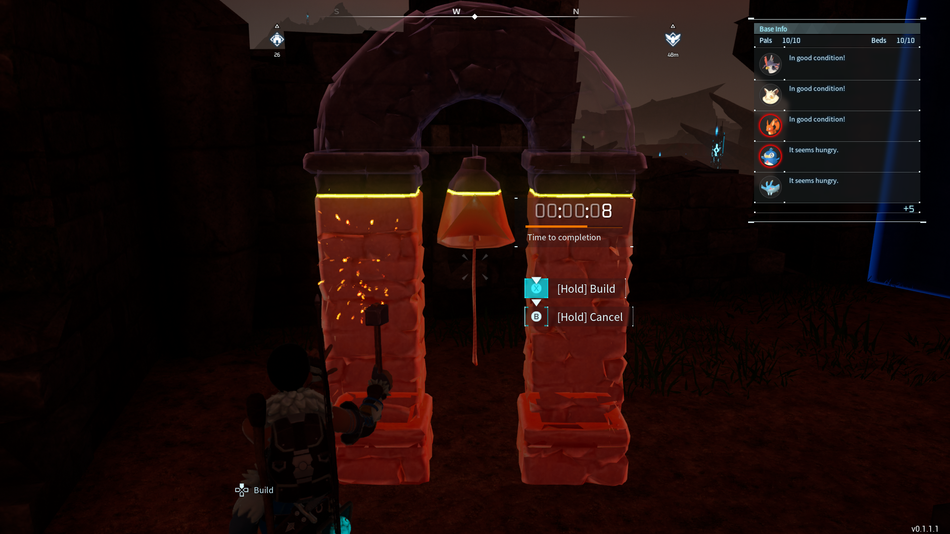
The solution is to install an alarm bell in your base and activate it. The alarm bell is specifically designed to alert your Pals when enemies attack, prompting them to cease their current activities and transition into combat mode. If they are already in combat mode, ringing the bell will prompt them to revert to their regular tasks.
Alarm Bell is available for production at level 4 and requires some basic materials. Once you have the alarm bell in your base, as soon as you are prompted about an enemy invasion, sound the alarm, and your Pals will greet your enemies properly.
DON'T MISS!