Trending

To give more value to Xbox Game Pass Ultimate subscribers, Microsoft has introduced a new perk for Overwatch 2. This perk provides a bundle of three skins for a limited time, letting players customise their favourite heroes' looks without extra cost.
Here's what you can expect from the Season 10 Xbox Ultimate Game Pass Bundle for Overwatch 2:
| Skin | Info | Rarity |
| Visual Kei Kiriko | Drawing inspiration from the Japanese musical movement, this design adds a hint of rock star flair to the support hero. | Epic |
| Executioner Junker Queen | The indomitable Junker Queen adopts a chilling new appearance. | Legendary |
| Medusa Widowmaker | This legendary skin turns the lethal sniper into a formidable Gorgon, drawing from Greek mythology. | Legendary |
How to claim the free Xbox Ultimate Game Pass Skins in Overwatch 2?
To take advantage of this limited-time offer, Xbox Game Pass Ultimate subscribers should follow these steps:
- Link the Accounts: First of all, you need to ensure that your Overwatch 2 account is linked to your Xbox account.
- Open the Xbox Game Pass App: Now, use the Xbox Game Pass app on PC, mobile, or Xbox console.
- Go to the Perks Tab: Next, you need to find the "Perks" section in the app.
- Claim the Perk Bundle: Here, choose the "Overwatch 2 Season 10 Perks Bundle" and follow the instructions to claim it.
Blizzard Entertainment
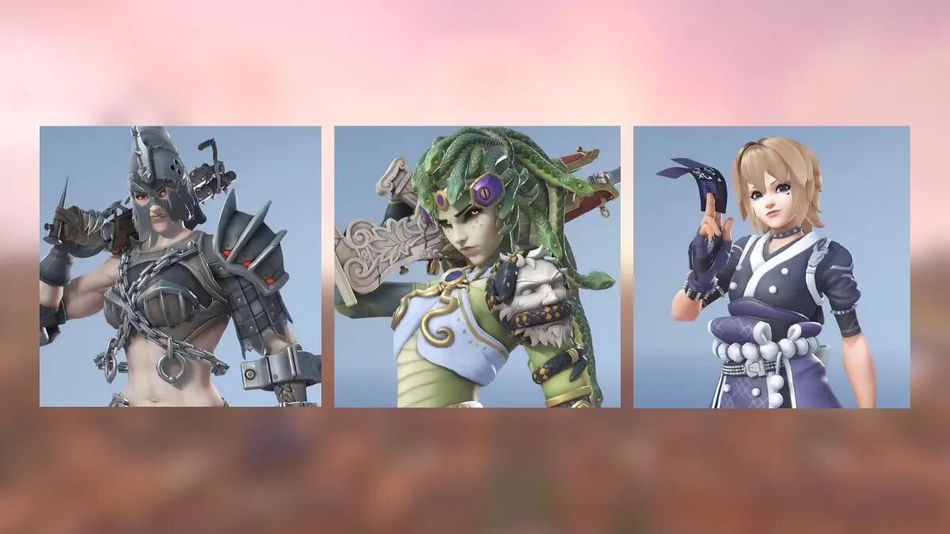
All of the Xbox Ultimate Battle Pass skins
- Redeem the Code: Now you need to wait for a unique code to be sent to you. After receiving it, redeem it through the Microsoft account page.
- Load Overwatch 2 on Xbox: Finally, start the game on your Xbox console to check to ensure the skins are available in your Hero Gallery.

Remember, this bundle is available only until June 19th, 2024, and the code must be redeemed by June 29th, 2024. Make sure to act quickly to secure these cosmetic items and upgrade your Overwatch 2 experience.
DON'T MISS:
- Overwatch 2 Game Pass guide: How to unlock Ultimate skins
- Overwatch 2 players are facing severe queue delays after recent updates
- Overwatch 2: Mirrorwatch event - Details, abilities, heroes, challenges, rewards and more
- Overwatch 2 Season 11 - New heroes, maps and more
- Overwatch's profanity filter is backfiring and causing major issues