Trending

Valorant, a highly popular FPS hero shooter from Riot Games, debuted in 2020 and has swiftly evolved into a prominent esports title, hosting various events and competitions. Inspired by elements from both Counter-Strike and Overwatch, Valorant is a tactical 5-on-5 shooter where teams engage in round-based plant-and-defuse scenarios.
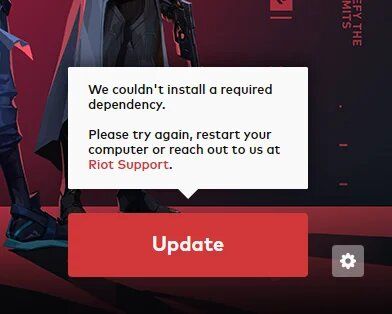
As with any competitive game, running into errors is something you don't want, especially during a game. So today we are going to address one of the most common errors Valorant players face, the "Couldn't install Dependency" error, and offer several straightforward solutions to resolve it.

How to fix the "Couldn't install dependency" error in Valorant?
Players facing this issue shouldn't worry about their system's health. The problem is related to incomplete file installation during Valorant's setup. This error message appears when some game files haven't been fully installed, often preventing players from launching the game.
This problem is typically linked to Vanguard's anti-cheat system, which is recognised as one of the best in the industry and was recently added to other Riot games. To resolve this issue, delete Vanguard from your system. Alternatively, you can uninstall Valorant and then reinstall it.
If that does not work, then follow these steps:
- Open Command Prompt on your Desktop.
- Ensure you run the application as an Administrator.
- First, paste ‘sc delete vgc’ and press Enter to run it.
- Next, paste ‘sc delete vgk’ and press Enter to run it.
- Then, restart your device.
- After restarting, go to the following file path: C:\Program Files\Riot Vanguard.
- Delete the entire folder. You will need administrator access to perform this action.

Lastly, you need to reinstall Valorant from the official website. As part of this process, Vanguard will be reinstalled on your system. Now you can launch the game and enjoy Valorant without encountering an error.
DON'T MISS: