Trending
Error Code 14515 is a common issue in Call of Duty: Modern Warfare 2 and Warzone 2 , often disrupting multiplayer experiences.
Although most problems stem from server-side issues beyond players' control, there are steps you can take to address specific error codes, including 14515.
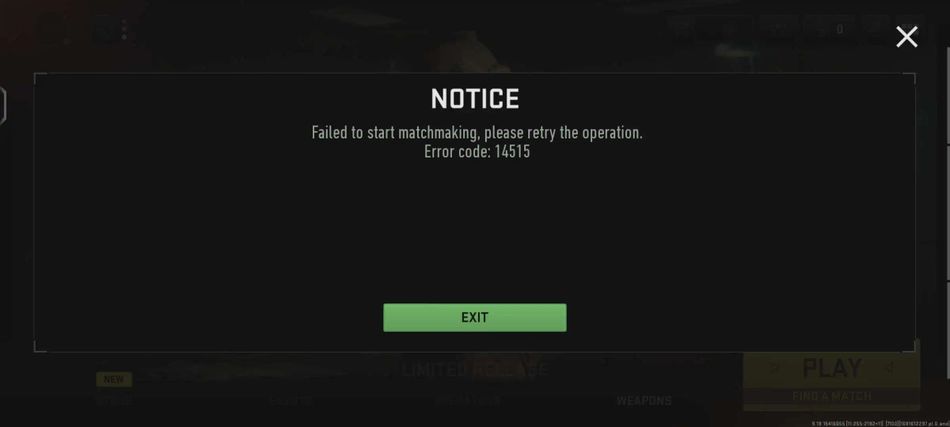
This guide outlines solutions to resolve the "Failed to Start Matchmaking" error 14515.

How to Resolve "Failed to Start Matchmaking" Error 14515 in Modern Warfare 2
When encountering the "Failed to Start Matchmaking" error 14515 in Modern Warfare 2 or Warzone, it's essential to understand that this issue arises when the game's servers are either intentionally down for maintenance or facing unexpected disruptions, rendering online features inaccessible across all platforms, including PC, PlayStation, and Xbox.
Troubleshooting Steps
If you're convinced that the servers are operational, and the error persists, consider these troubleshooting steps:
- Stabilize Your Internet Connection: Ensure a stable internet connection by using a wired ethernet connection or resetting your Wi-Fi router.
- Restart Modern Warfare 2 or Warzone 2: Completely restart the game to see if the error resolves itself.
- If the issue persists after these steps, a comprehensive system reset might be necessary. Turn off your gaming platform (PlayStation, Xbox, or PC) and perform a full power cycle. This can effectively address connection issues that may be preventing access to Warzone 2 or Modern Warfare 2 servers.
- If none of these efforts yield positive results, the final recourse is to contact Activision support for assistance in resolving the issue.
DON'T MISS:
- Call of Duty: Warzone 2.0 - Best weapons in Season 5 ranked
- Call of Duty: Warzone 2.0 - Best sniper loadouts in Season 5
- Call of Duty: Warzone 2.0 - Best PC settings for high FPS, graphics and visibility in Season 5
- How to claim the free Shadow Combat pack in Call of Duty: Warzone 2.0 and Modern Warfare 2
- Call of Duty: Warzone 2.0 - Best audio settings for Season 5