Trending
Valorant developed by Riot Games, is a highly popular 5v5 competitive shooter that has gained immense global recognition as a leading esports title. Presently, the game is accessible in nearly all countries across the world.
Given its massive fan base, it comes as no surprise that Valorant offers a range of language options to cater to diverse player preferences. With the game currently supporting sixteen languages, newcomers might find themselves unsure about how to customize the language setting according to their preferences.
To alleviate any confusion, we present a comprehensive guide on how to effortlessly modify the language in Valorant. Whether you're a seasoned player or just starting out, this guide will help you navigate the process of language adjustment in Valorant with ease.

Languages in Valorant
The language selected in Valorant has a significant impact on various aspects of the game, including in-game voice outputs, HUD elements, and the user interface. Among the multitude of language options available, the most popular ones in Valorant are Japanese, Spanish, and English.
Currently, Valorant supports a total of sixteen different languages.
Here is a comprehensive list of the available language choices in the game:
- Portuguese (Brazil)
- French
- Indonesian
- Korean
- German
- Vietnamese
- Chinese (Traditional)
- Arabic
- Italian
- Spanish (European and Latin American)
- Thai
- Polish
- Turkish
- Russian
- English
- Japanese
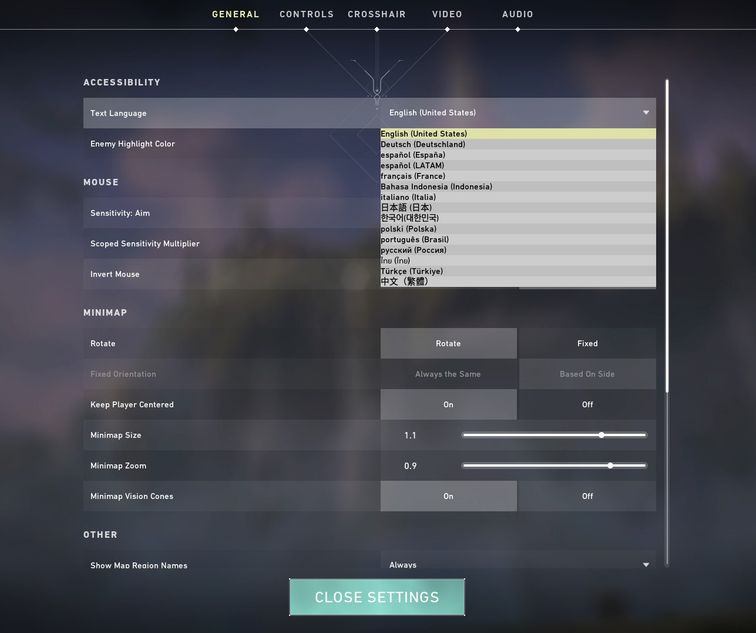
How to change language in Valorant
To modify the language in VALORANT, begin by launching the game, and then proceed with the following instructions:
- Head to the Settings from the top-right of the game
- Now navigate to the Accessibility tab from Settings
- Select the Text Language prompt and click on the drop-down sign
- Now select your preferred language from the languages available
Now, navigate to the game interface and select the language that you prefer for your better in-game experience.
DON'T MISS: