Trending
A lot of players are complaining about their game and/or Battlestate Games Launcher not wanting to work properly. While Escape from Tarkov is still a closed beta game, the issues are too big to be ignored as a lot of players have deemed the survival shooter unplayable when it has this error.
To fix this, follow these steps:
1. Press Win + R
This will open a pop-up window where you can run any app on your computer
2, Type Regedit
3. Navigate to HKEY_LOCAL_MACHINE\SYSTEM\CurrentControlSet\Control\SecurityProviders\SCHANNEL\Protocols
3. Right-click on "Protocols", select "New" and then "Key"
4. Rename the new folder in TLS 1.2
5. Right-click on the folder TLS 1.2 and select "New" and then "Key"
6. Rename the folder to "Client"
7. Right-click the Client folder and select "New" and then "DWORD (32-bit) Value" from the list
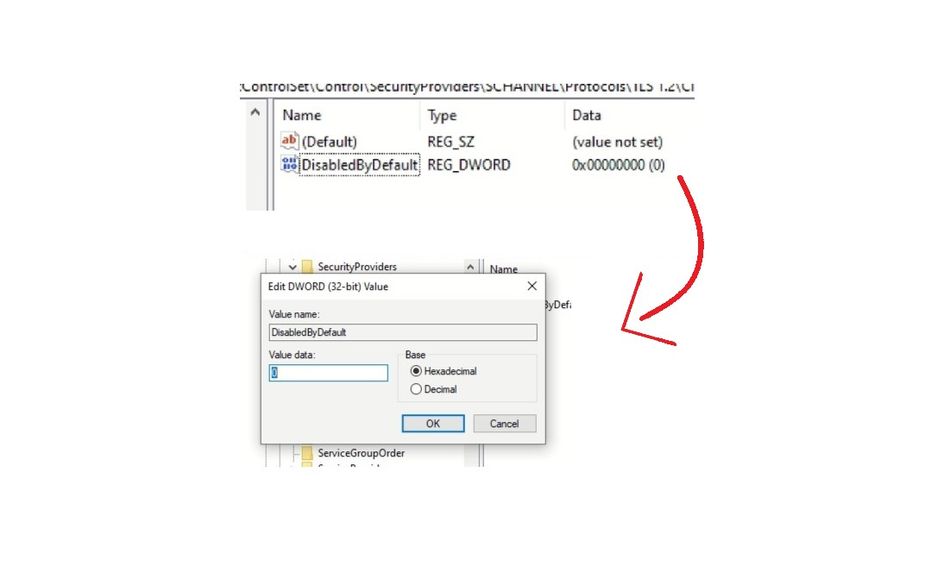
8. Rename it to DisabledByDefault
9. Double-click "DisabledByDefault" and set the Value data to be 0
10. Click OK and restart your computer.
If the issue persists, do the following:
1. Follow the steps till step 3
2. Navigate to HKEY_LOCAL_MACHINE\SYSTEM\CurrentControlSet\Control\SecurityProviders\SCHANNEL\Protocols\TLS 1.3\Client
3. Right-click the "Enabled" key on the right and modify the data to be 0 and not a 1.

If somehow neither of the solutions works, the two options that remain are either contacting the support or reinstalling your game.
DON'T MISS: