Trending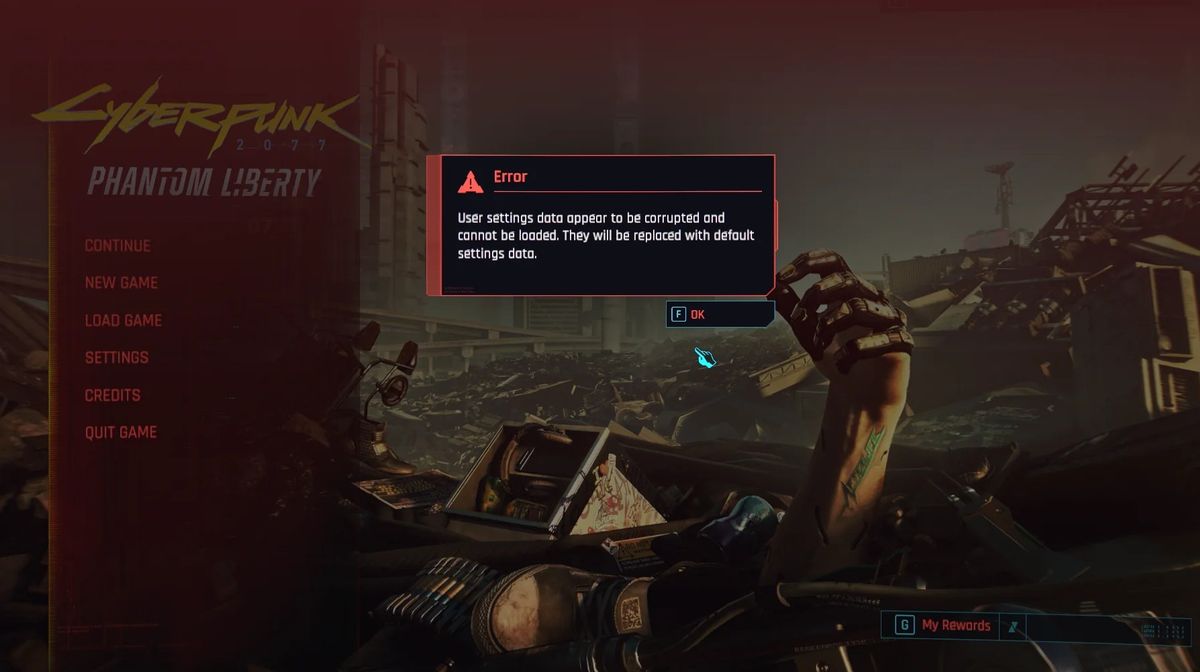

Recently, I've started another playthrough of Cyberpunk 2077 to check out the new vehicles and other features in Update 2.2. However, I've discovered what proved to be a very annoying and persistent error that prevented me from saving my video, audio or any other settings in the game's menu.
Basically, every time I started the game, my graphical settings were reset to the lowest resolution, my HUD was almost entirely off and key bindings were back to default.
The game would crash whenever I tried to change settings and even when the settings would apply, I'd still be playing without things like path tracing that requires restarting the game.
After an extensive search on Google and Reddit, I've discovered that there are many players that have the same issue. Unfortunately, none of them had a solution for this problem so I had to find it myself.
Cyberpunk 2077 "user settings data is corrupted and cannot be saved" fix
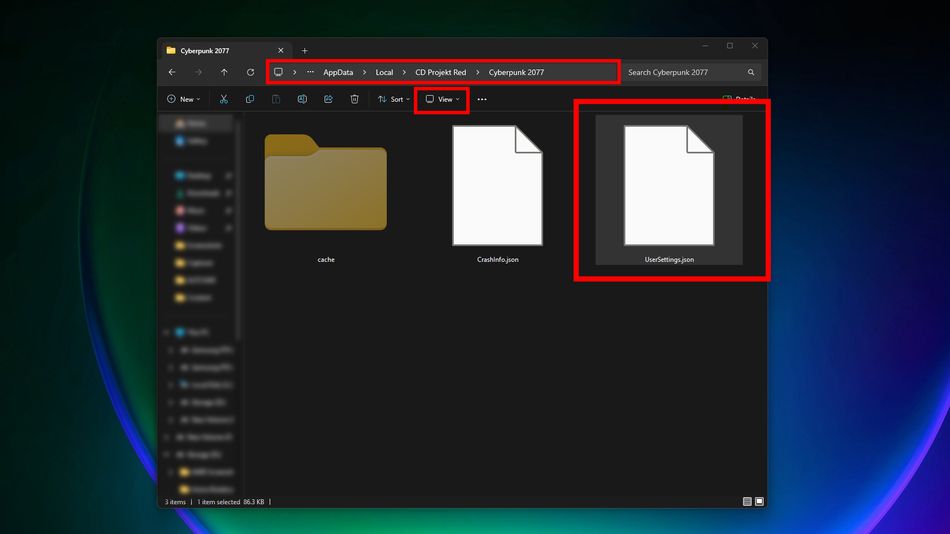
Since the error we're getting is related to a corrupted user settings file, the only logical thing would be to find this particular file. That's easier said than done since Cyberpunk 2077's user settings are buried in the AppData folder. Here's a step-by-step guide on how to find this file and fix the problem:
- In the Windows Search Bar, search for "Run" and open the Run system app.
- In the "Open" field, enter the following address: "AppData\Local\CD Projekt Red\Cyberpunk 2077"
- Or, open File Explorer and enter this path into the address bar at the top: C:\Users\AltChar\AppData\Local\CD Projekt Red\Cyberpunk 2077
- Just make sure to change AltChar to your username on Windows.
- Once you're in the folder, you should see a file called "UserSettings.json".
- If you don't see the file, click on the "View" button in the toolbar, then "Show" and finally click "Hidden Items".
- You should now see the "UserSettings.json" file.
- Delete the "UserSettings.json" file.
- Run the game and test if this fix worked. You should be able to change and apply settings in the menu.
As soon as I did this, the game allowed me to apply any settings I wanted. It didn't crash, it didn't send back messages about user settings being corrupted.
Before I deleted the file, I tried reinstalling the game, verifying files and other potential fixes but none of that worked. I suggest you give it a go if you're struggling to make the game work, like I did.

If this guide helped you, consider giving us a follow on X or BlueSky. We'd really appreciate it!
DON'T MISS: