Trending

Marvel Rivals is a strictly competitive game that requires players to put out their best performance to win matches in Quick Match and Competitive. However, to put out your best performance, you need to have decent video settings optimisation to get the highest FPS count.
If you're serious about doing well in Marvel Rivals, then make sure to properly optimise your video settings. Here's a quick rundown of the ideal video settings you need to use in Marvel Rivals.

Best Video Settings in Marvel Rivals for More FPS
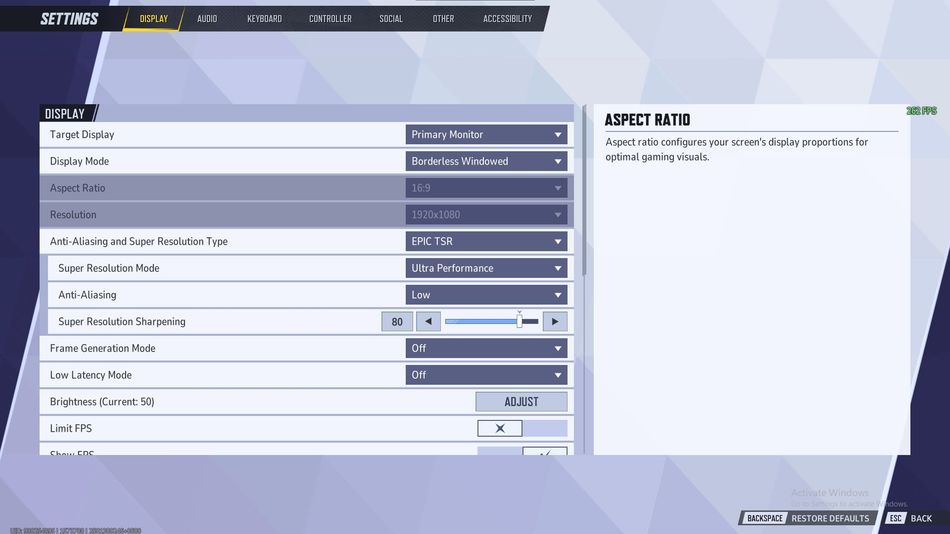
As Marvel Rivals runs on Unreal Engine 5, the game might be unstable for lower-end GPUs. However, if you have enough RAM and a proper CPU, you can easily run the game with the highest optimisation. Here's an overview of the video settings you need to use in Marvel Rivals:
- Target Display: Primary Monitor
- Display Mode: Fullscreen
- Aspect Ratio: 16:9
- Resolution: Match it with your Monitor
- Anti-Aliasing and Super Resolution Type: EPIC TSR with Super Resolution set to Performance and Anti-Aliasing set to Ultra
- Frame Generation Mode: Off
- Low Latency Mode: On
- Brightness: 50
- Limit FPS: Off
- Show FPS: On
- Network Stats: On
- VSync: Off
- Optimized Settings: Custom
- Graphics Quality: Low
- Global Illumination: SSGI—Low Quality
- Reflection Quality: Screen Space Reflections
- Model Detail: Low
- Post-Processing: Low
- Shadow Detail: Medium
- Texture Detail: Low
- Effects Detail: Low
- Foliage Quality: Low
As the game is completely built on Unreal Engine 5, there are certain stability issues that arise after the game's update. To avoid such problems, make sure to update your graphics drivers regularly and remember to turn off background programs such as Google Chrome to reduce the consumption of RAM and GPU. If you're facing any issues, like perspective change during a match, make sure to restart your game after applying these settings.

DON'T MISS: