Trending

Call of Duty: Modern Warfare 3, the crown jewel of the Call of Duty franchise, has enthralled gamers with its revamped multiplayer experience.
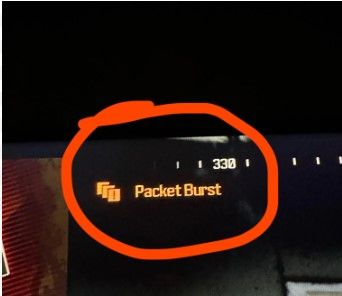
However, the specter of packet burst issues has haunted many players, causing frustrating lags during crucial gunfights. In this guide, we delve into the realm of packet burst and present effective solutions to elevate your gaming experience.
Packet burst, also known as packet loss, is an internet woe that disrupts the seamless flow of specific inputs to the server. Unlike server-side issues, this pesky problem stems from your Internet Service Provider (ISP), leading to erratic bullet impacts and an overall exasperating gameplay experience in Modern Warfare 3.
Fixes for Modern Warfare 3
As packet burst is a client-side quandary, various remedies exist to banish this digital demon.
Here's a curated list of the best fixes to bid farewell to packet burst in Modern Warfare 3:
- Restart Your Router
- A classic remedy for many client-side issues, including ping spikes and packet bursts. Give your router a breather and witness the magic as you load up Modern Warfare 3.
- Disable Crossplay
- For console users, disabling crossplay could be a game-changer. While this option is available on PS5 and Xbox servers, PC players, unfortunately, have to stick to the crossplay servers.
- Turn off "On-Demand Texture Streaming"
- A graphical setting exclusively for consoles. Navigate to your in-game Graphics settings and bid farewell to On-Demand Texture Streaming. This tweak might enhance your game's smoothness, contingent on your internet connection.
- Check WiFi Settings on the Console (PS5, Xbox)
- Dive into your console's network settings and ensure it's cozy with the right frequency band of your WiFi router. If your router flaunts a dual-band, opt for the speedier 5 GHz frequency over the conventional 2.4 GHz frequency.
If all else fails
Should the specter of packet burst persist, don't hesitate to reach out to your ISP. They might hold the key to unveiling any clandestine faults in your internet connection.
Remember, in the battle against packet burst, knowledge is your most potent weapon. Equip yourself with these remedies, and may your journey through Modern Warfare 3 be lag-free and triumphant.
DON'T MISS:
- Call of Duty MW3 - Double XP event end times for every region
- Call of Duty: MW3 - How to get the Royalty Tiger camo
- How to fix Zombie crashing issues on PC in Call of Duty: MW3?
- Call of Duty: MW3 - Rank progression weapon unlocks and armory advancements
- Resolving the "Join failed because you are on a different version" error in Call of Duty: MW3