Trending
For those who have experienced Sea of Stars, the turn-based RPG by Sabotage Studio, you may have observed that enemy health isn't displayed during combat. This absence of information can lead to uncertainty regarding the number of additional attacks required to vanquish an opponent.
Given Sea of Stars' reliance on a turn-based combat system, this knowledge becomes particularly critical, especially in situations where we find ourselves confronted by a sizable horde of adversaries.
If you're curious about discovering a method to actually view the enemy's HP during battles, rest assured that a solution exists, and this guide is poised to unveil it to you.
Where to find Abacus ring in Sea of Stars
Once the game's introduction concludes and you have the third member in your attack party, go up from the campfire to the save point. On the left, you'll notice a cave entrance.
Upon entering the cave, you'll encounter three monsters ready for a confrontation. Once you've dealt with them, ascend the platforms—begin with the left one and then leap to the right platform.
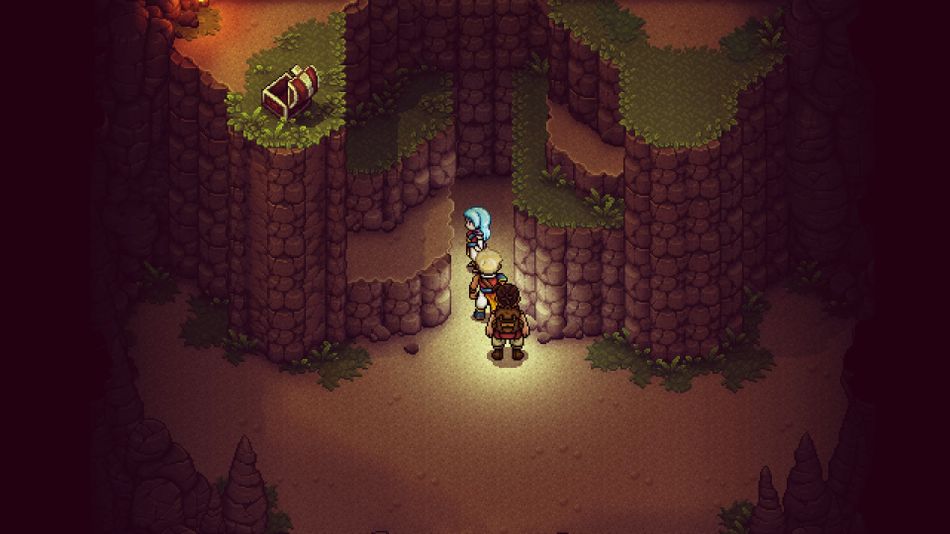
Atop the left platform, you'll find a chest holding an Abacus ring. Equipping this ring on a character will grant you the ability to view the enemy's HP in battle. It's important to note that this ring only reveals HP for regular enemies, and not for bosses, who will still remain without visible HP.

DON'T MISS!